Joy-Con drift on the Nintendo Switch can turn even the best gaming session into a frustrating experience. That moment when your character starts moving on their own is all too familiar to many players. While there are ways to fix it — from quick cleaning to deeper repairs — the real question is why this issue happens in the first place and what you can do to prevent it. Understanding Joy-Con drift might be the key to keeping your gameplay smooth and your console lasting longer.
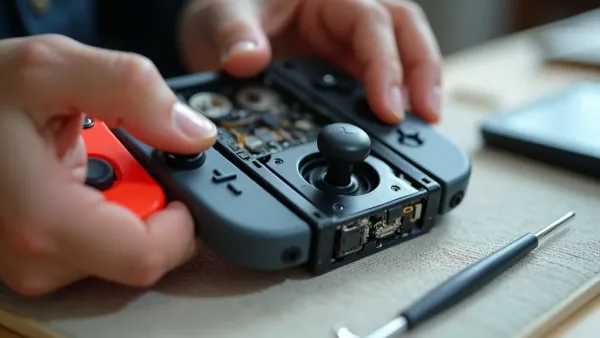
Joy-Con drift on Nintendo Switch can often be fixed with simple steps at home. (Image: ABWavesGame)
Although many solutions are simple enough to try at home, the drift problem highlights how sensitive and delicate the Joy-Con’s analog sticks really are. From internal wear to dust and debris stuck under the rubber seals, several factors can trigger these unwanted movements. The more you understand what’s causing the drift, the easier it becomes to pick the right fix and prevent the issue from happening again in the future.
Joy-Con drift often shows up as unintended character movement or a cursor sliding on its own, even when you’re not touching the stick. This might seem like a minor inconvenience in the beginning, but it tends to worsen over time. In some games, such as shooters or platformers, even a slight drift can completely disrupt your ability to aim, move, or interact with the environment.
You might also notice slight joystick deviations during gameplay — like your character veering off course or camera angles shifting unexpectedly. In more severe cases, menus may scroll automatically, or selecting items becomes impossible because the cursor keeps sliding in one direction.
Understanding common causes of Joy-Con drift, such as wear on internal components or dust buildup, helps with early detection. Stick sensors are especially delicate, and even small particles can interfere with the internal mechanism.
Catching Joy-Con drift early lets you troubleshoot sooner, prevent further wear, and keep your gaming experience smooth. The sooner you identify the issue, the faster you can apply a fix before the damage becomes harder to reverse.
Cleaning and maintenance techniques
Once Joy-Con drift symptoms are identified, addressing the issue quickly can prevent further deterioration. Dirt particles, skin oils, and dust accumulate under the rubber membrane that surrounds the joystick. Over time, this buildup interferes with the stick’s sensors and leads to drift.
Effective cleaning and maintenance techniques for Joy-Con drift are essential preventive measures. Regular upkeep, like gently removing dust and debris around the joystick using isopropyl alcohol (at least 70%) and soft tools such as cotton swabs or microfiber cloths, helps ensure smoother operation.
When cleaning the exterior, avoid applying too much pressure, which could push debris further inside. Cleaning should be gentle but consistent. Even small maintenance habits, such as wiping down the Joy-Cons after long sessions or keeping them stored in dust-free areas, contribute to slowing down wear.
Consistent care reduces wear, prolongs the controller’s lifespan, and minimizes Joy-Con drift over time. For gamers, building a simple routine to combat Joy-Con drift can keep gameplay responsive and frustration-free.
DIY calibration and reset procedures
Performing DIY calibration and reset procedures can effectively fix Joy-Con drift without needing professional repair. These steps are easy, safe, and often surprisingly effective.
Start with DIY calibration and reset procedures in the Nintendo Switch settings to realign joystick inputs and improve accuracy. The system allows you to test stick movement and adjust the controls so that the Joy-Con understands the neutral position correctly.
If issues persist, try additional DIY calibration and reset procedures such as:
Unpairing and reconnecting the Joy-Con to the console
Restarting the Nintendo Switch to recalibrate motion and joystick sensors
Updating the Joy-Con firmware, which can resolve software-related drift issues
These procedures often resolve minor drift problems for gamers and can be completed in just a few minutes. Even when cleaning doesn’t help, recalibration can fix inconsistencies caused by software glitches rather than hardware damage.
Using contact cleaner for stick drift
If you’re dealing with Joy-Con stick drift, using contact cleaner for stick drift can be a quick and affordable fix. Many gamers report success by applying an electronic-safe contact cleaner to remove dust and grime from the joystick’s internal components.
Always choose an electronics-safe spray to avoid damage, and follow safe application methods. Using the wrong type of cleaner may corrode or permanently damage the components, so choosing the right product is essential.
To use contact cleaner for stick drift, gently lift the rubber skirt at the joystick base and spray a small amount into the opening. Move the stick in all directions to help the solution spread and break down debris inside the mechanism.
Let it dry completely before testing. Giving it at least a few minutes ensures the cleaner evaporates and leaves the internal contacts free of moisture.
While using contact cleaner for stick drift won’t fix every hardware issue — especially if the internal mechanism is physically worn down — it’s a smart first step before considering repairs or replacement. Many players find that cleaning resolves the issue for months, or even permanently.
Official repair and replacement options
Official repair and replacement options are a reliable fix for Joy-Con drift when basic troubleshooting doesn’t work. Nintendo has acknowledged Joy-Con drift as a widespread issue, and in many regions, they offer free or low-cost repairs even after warranty expiration.
If your controller is still under warranty, you may be eligible to get it repaired or replaced at no cost. In some cases, Nintendo covers shipping as well, making the process even more convenient.
Nintendo support makes the process straightforward, guiding you through submitting a repair request so your Joy-Con drift issue is handled by professionals. Trained technicians can replace worn components that regular users cannot access safely.
For gamers who want a long-term solution, these official repair and replacement options provide peace of mind, ensuring Joy-Con drift doesn’t ruin your gameplay. While DIY fixes are practical, official repairs often offer the most reliable and lasting results.
Preventing Joy-Con drift in the future
While fixes are important, prevention can save you time, stress, and money. Some simple habits can significantly reduce the chance of drift returning:
Store your Joy-Cons in clean, dry environments
Avoid excessive force when using the sticks
Keep hands clean during gameplay to reduce dirt transfer
Use controller grips or protective cases, which can reduce exposure to dust
Update firmware regularly to avoid software-based drift issues
Joy-Con drift on Nintendo Switch can often be fixed with simple steps at home. Start by cleaning the joystick and recalibrating the controller in the system settings, which solves many Nintendo Switch Joy-Con drift issues. For more stubborn problems, use an electronics-safe contact cleaner to remove dirt and debris under the stick without taking the controller apart.
If the Nintendo Switch Joy-Con drift continues after cleaning and recalibration, contact the company for an official repair or replacement. These steps help extend your controller’s lifespan and keep your gameplay smooth. With proper care and maintenance, you can reduce the chances of drift returning and enjoy a more reliable gaming experience.