Published on September 1, 2025 at 4:00 PMUpdated on September 1, 2025 at 4:00 PM
Advertising
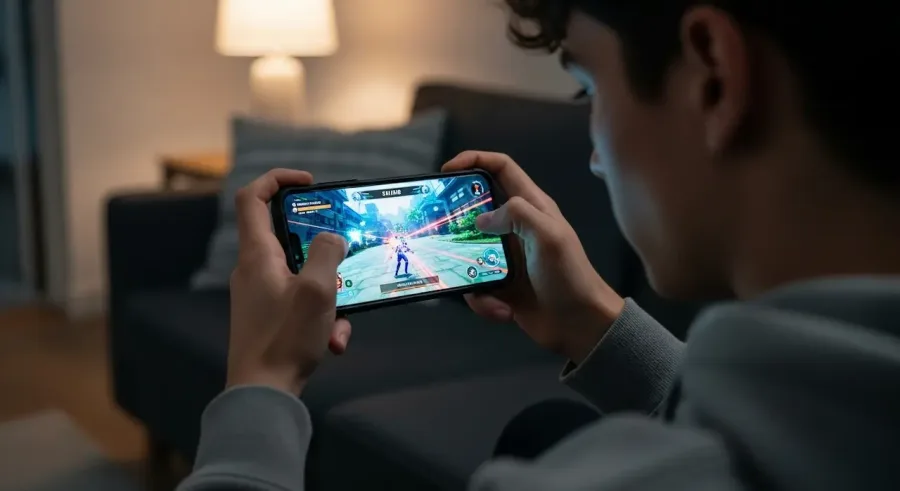
If you’re serious about mobile gaming, you already know that every millisecond matters. Whether you’re competing in high-intensity shooters, fast-paced MOBAs, or rhythm games where precision is everything, the speed at which your device reacts to your touch can make or break your entire experience.
The faster your screen registers your input, the smoother, more fluid, and more immersive the gameplay becomes. That’s why lowering touch latency on Android devices is a must for players who want sharper reactions, tighter controls, and a real competitive edge.
Touch latency refers to the delay between the moment your finger touches the screen and the moment the action is shown in the game. While a small delay may seem unnoticeable during everyday tasks like browsing or messaging, it becomes crucial in gaming.
A few extra milliseconds can be the difference between landing a perfect combo or missing it, dodging an attack or getting eliminated, or claiming victory instead of defeat. The good news is that by making a series of smart adjustments to your Android device—most of which don’t require any special tools—you can significantly reduce touch latency and enjoy a faster, more responsive gaming experience.
Touch latency is influenced by several factors working together behind the scenes. It’s not just about your screen—it involves hardware, software, and system settings. Understanding what contributes to latency helps you make better decisions when optimizing your device.
Hardware specifications: Your phone’s processor (CPU), graphics chip (GPU), RAM, and touchscreen hardware all affect how fast input is processed. Older or budget devices may naturally have higher latency, while gaming-oriented phones often include dedicated touch-sampling hardware for ultra-low latency.
Display refresh rate: A higher refresh rate (such as 90Hz, 120Hz, or 144Hz) allows your screen to update faster, making your touches appear more immediate. If your device supports a higher refresh rate but you’re not using it, you’re leaving performance on the table.
Touch sampling rate: This measures how many times per second the screen scans for your finger. A display with 240Hz or 360Hz touch sampling reacts far faster than one with 60Hz or 120Hz.
Background apps and processes: Every app running in the background uses resources such as memory and CPU. When these resources are being consumed by other apps, your game may respond more slowly.
Battery and thermal restrictions: When your phone gets hot or tries to save battery, it may throttle performance. This reduces the speed at which touch inputs get processed.
Software optimization: Game engines, Android updates, and device-specific firmware also influence latency. Poor optimization can create extra delays—even on powerful hardware.
How to Lower Touch Latency on Android
Below are proven methods to reduce latency and improve the responsiveness of your device while gaming.
1. Optimize Graphics Settings
High-end graphics can be visually stunning, but they often increase latency if your device struggles to keep up. Your phone has to process more information, and that additional workload slows down touch response. Lowering the graphics settings can dramatically improve input speed.
To do this, try:
Lowering resolution
Reducing texture quality
Turning off shadows
Disabling anti-aliasing
Reducing visual effects like motion blur or bloom
By easing the GPU’s workload, your device can focus on processing inputs faster. The visuals might be slightly less detailed, but your gameplay experience will feel much snappier and more fluid.
2. Switch to Performance Mode
Most modern Android devices offer different performance profiles, such as:
Battery Saver
Balanced Mode
Performance or High-Performance Mode
Always choose Performance Mode for gaming. This profile boosts CPU and GPU frequencies and allows the device to operate at maximum responsiveness. It reduces input lag by making sure the system doesn’t limit resources.
Keep in mind:
Performance Mode uses more battery.
The phone may generate more heat.
You may want to plug in the charger during long gaming sessions.
Still, the responsiveness boost is worth it, especially for competitive players.
3. Disable Background Processes
Background apps are silent performance killers. Even apps you aren’t actively using can drain RAM and steal CPU power—both of which directly increase touch latency.
To reduce background activity:
Close all recent apps before gaming.
Disable auto-sync for non-essential apps.
Restrict background data in system settings.
Use built-in device maintenance tools (available on Samsung, Xiaomi, OnePlus, etc.).
With fewer tasks running behind the scenes, your phone can devote its power to your game, improving both speed and responsiveness.
4. Adjust Battery and Display Settings
Battery settings may seem unrelated to touch responsiveness, but they play a huge role. Never use Battery Saver Mode while gaming—it slows down your CPU, reduces refresh rates, and increases latency noticeably.
Instead, try:
Using Normal or Performance Mode
Enabling high refresh rate settings (90Hz / 120Hz / 144Hz)
Keeping brightness at a moderate level to avoid thermal throttling
Turning off adaptive battery or battery optimization for your game
Higher refresh rates especially make a massive difference, because the screen updates faster and registers touch input more frequently.
5. Use Game Mode Features
Most Android manufacturers include a built-in Game Mode, Game Dashboard, or Game Space. These tools automatically optimize the device for gaming by:
Blocking notifications
Minimizing background processes
Boosting CPU/GPU performance
Enhancing touch response or reducing accidental touches
Allowing per-game configuration
Some gaming phones like ASUS ROG, Xiaomi Black Shark, and RedMagic even offer extreme touch-tuning options, such as increasing the touch sampling rate or adjusting sensitivity for different game genres.
6. Keep Your Device Updated
Device updates and game updates often include performance improvements or input-lag fixes. Keeping your system up to date ensures that you benefit from the latest optimizations.
Always update:
Android OS
Manufacturer firmware
Game apps
GPU drivers (supported on some devices)
Small improvements add up—and even a 10-millisecond reduction in latency can feel huge in competitive gaming.
7. Explore Third-Party Boosters
Tools like Game Booster, Gaming Mode, or specific OEM optimizers can help reduce latency even further. These apps often:
Boost touch responsiveness
Close background tasks automatically
Prioritize system resources
Reduce network latency
However, always download such apps from trusted, reputable sources to ensure safety and performance.
Conclusion
Lowering touch latency is not just about technical adjustments—it’s about unlocking your device’s full potential and elevating your overall gaming experience. With the right tweaks, even standard smartphones can feel faster and more responsive, giving you smoother gameplay and sharper reactions.
From optimizing graphics and enabling performance modes to closing background apps and keeping software updated, each small improvement contributes to a noticeable reduction in latency. Whether you’re grinding through ranked matches or enjoying your favorite RPG casually, faster touch response can transform how your games feel.
So the next time you dive into mobile gaming, remember: lowering touch latency could be the upgrade that completely changes your gameplay—giving you the speed, precision, and advantage you’ve been missing.